Redesigning the PIA VPN App
PRODUCT DESIGN
B2C
About PIA VPN
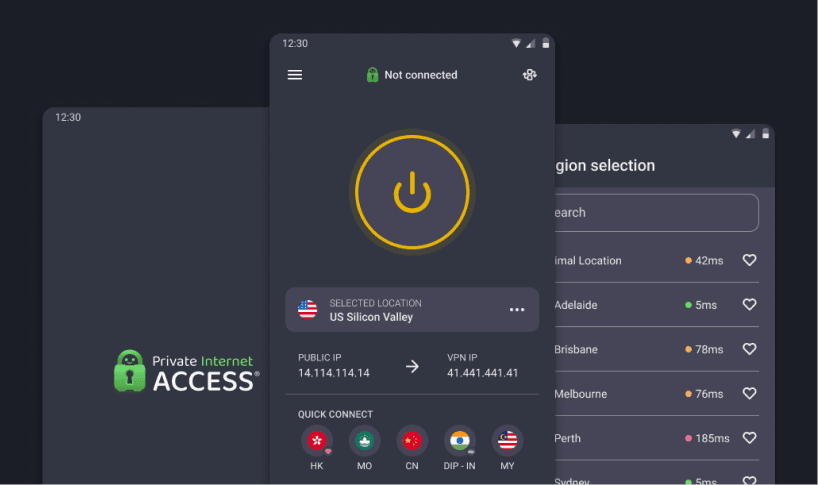
Private Internet Access is a VPN service that helps users secure their internet activity, protect privacy, and connect safely across devices. The app is the primary way subscribers interact with the service, handling connections, server selection, and features such as Optimal Location and Dedicated IP.
By 2023, the app needed more than a visual update. It still reflected pre-2021 brand assets, and usability testing revealed friction in core flows: users hesitated at server selection, misunderstood feature icons, and struggled with accessibility gaps like undersized touch targets. The redesign addressed these issues while aligning the app with the refreshed brand identity.
TL;DR
Goal:
Redesign the PIA VPN app to fix usability issues in core flows, meet WCAG 2.1 AA accessibility standards, and align with the 2021 brand identity.
Key problems:
Users hesitated at server selection due to unclear icons. "Automatic" and "Dedicated IP" features were misunderstood. Touch targets and contrast failed accessibility standards. No documented component system existed.
Timeline:
15 weeks total (2 weeks research, 5 weeks design, 5 weeks development, 3 weeks post-launch measurement)
Role:
Design lead. Managed a team of senior and lead product designers. Owned research planning, design direction, and cross-department coordination with product, engineering, and QA. Hands-on contributor to UI redesign, component library, and accessibility audit.
What shipped
Redesigned server selection flow with clearer iconography and labels. Built a documented, scalable component library in Figma. Introduced WCAG-compliant touch targets and contrast ratios. Unified visual language with 2021 brand.
Goal:
Redesign the PIA VPN app to fix usability issues in core flows, meet WCAG 2.1 AA accessibility standards, and align with the 2021 brand identity.
Key problems:
Users hesitated at server selection due to unclear icons. "Automatic" and "Dedicated IP" features were misunderstood. Touch targets and contrast failed accessibility standards. No documented component system existed.
Timeline:
15 weeks total (2 weeks research, 5 weeks design, 5 weeks development, 3 weeks post-launch measurement)
Role:
Design lead. Managed a team of senior and lead product designers. Owned research planning, design direction, and cross-department coordination with product, engineering, and QA. Hands-on contributor to UI redesign, component library, and accessibility audit.
What shipped
Redesigned server selection flow with clearer iconography and labels. Built a documented, scalable component library in Figma. Introduced WCAG-compliant touch targets and contrast ratios. Unified visual language with 2021 brand.
Results:
+32%
Optimal Location adoption
+32%
Optimal Location adoption
+32%
Optimal Location adoption
+27%
Dedicated IP usage
+27%
Dedicated IP usage
+27%
Dedicated IP usage
-19%
Server selection time
-19%
Server selection time
-19%
Server selection time
+22%
User satisfaction
+22%
User satisfaction
+22%
User satisfaction
Project Overview
Users could complete core actions, but the experience created friction. Usability testing confirmed that icons were misread, features like Optimal Location and Dedicated IP were misunderstood, and accessibility gaps slowed interaction. The app's visual language still reflected pre-2021 brand assets, creating disconnect with marketing and web touchpoints.
The redesign launched in Q1 2024, timed with a re-architected Android app and roadmap updates for multi-platform consistency. This made it the right moment to unify the experience across platforms while addressing usability and accessibility debt.
Users could complete core actions, but the experience created friction. Usability testing confirmed that icons were misread, features like Optimal Location and Dedicated IP were misunderstood, and accessibility gaps slowed interaction. The app's visual language still reflected pre-2021 brand assets, creating disconnect with marketing and web touchpoints.
The redesign launched in Q1 2024, timed with a re-architected Android app and roadmap updates for multi-platform consistency. This made it the right moment to unify the experience across platforms while addressing usability and accessibility debt.
Research & Usability Testing
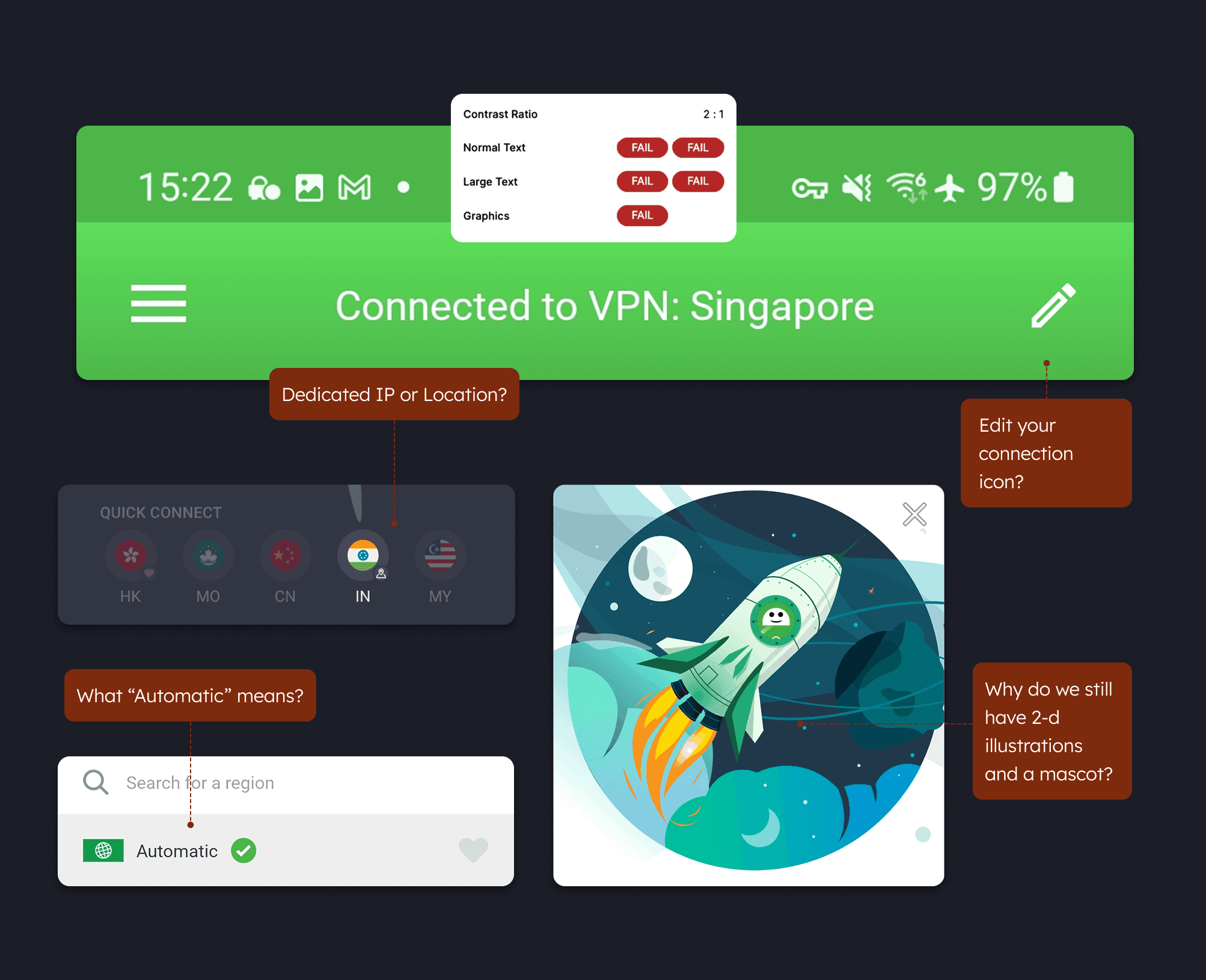
We ran usability sessions with seven participants, testing core tasks: connecting to a server, selecting a region, and using Dedicated IP. Sessions revealed consistent friction points.
On the customize icon, one user said:
"I thought it was an edit connection button. Maybe use something that shows that I can switch things around."On the Automatic server option:
"I would even give it a one [look] because I need it to be clear to me. I'm using a VPN - I need flexibility, so what is this 'Automatic' all about?"On the Dedicated IP icon: "
This icon looks like a location icon, a map icon, not an IP address. Just put IP or something. Something more obvious."
Alongside usability testing, we audited the existing UI for accessibility and consistency.
The audit revealed touch targets below WCAG minimums, contrast ratios as low as 2:1 (against the required 4.5:1), and duplicated component patterns with no documentation.
These findings shaped both the immediate redesign priorities and the case for building a documented component library.
Identified Pain Points
Unclear iconography in core flows
Users misread key interface elements. The customize icon (pencil) was mistaken for connection editing. The Dedicated IP icon (map pin) was confused with location selection. The "Automatic" server option didn't communicate its purpose.
Accessibility failures
The existing UI failed WCAG standards. Touch targets were undersized, and contrast ratios measured 2:1 against the required 4.5:1 minimum. The header bar failed all text and graphics accessibility checks.
Outdated visual language
The app still used pre-2021 brand assets, including 2D illustrations and a mascot that no longer matched PIA's refreshed identity. This created a disconnect with marketing and web touchpoints.
No scalable component system
Components had been designed in isolation with no documentation. Duplicated patterns and inconsistent states made new features expensive to build and QA.
Unclear iconography in core flows
Users misread key interface elements. The customize icon (pencil) was mistaken for connection editing. The Dedicated IP icon (map pin) was confused with location selection. The "Automatic" server option didn't communicate its purpose.
Accessibility failures
The existing UI failed WCAG standards. Touch targets were undersized, and contrast ratios measured 2:1 against the required 4.5:1 minimum. The header bar failed all text and graphics accessibility checks.
Outdated visual language
The app still used pre-2021 brand assets, including 2D illustrations and a mascot that no longer matched PIA's refreshed identity. This created a disconnect with marketing and web touchpoints.
No scalable component system
Components had been designed in isolation with no documentation. Duplicated patterns and inconsistent states made new features expensive to build and QA.
Unclear iconography in core flows
Users misread key interface elements. The customize icon (pencil) was mistaken for connection editing. The Dedicated IP icon (map pin) was confused with location selection. The "Automatic" server option didn't communicate its purpose.
Accessibility failures
The existing UI failed WCAG standards. Touch targets were undersized, and contrast ratios measured 2:1 against the required 4.5:1 minimum. The header bar failed all text and graphics accessibility checks.
Outdated visual language
The app still used pre-2021 brand assets, including 2D illustrations and a mascot that no longer matched PIA's refreshed identity. This created a disconnect with marketing and web touchpoints.
No scalable component system
Components had been designed in isolation with no documentation. Duplicated patterns and inconsistent states made new features expensive to build and QA.
Implemented Solutions
Server selection clarity
Problem:
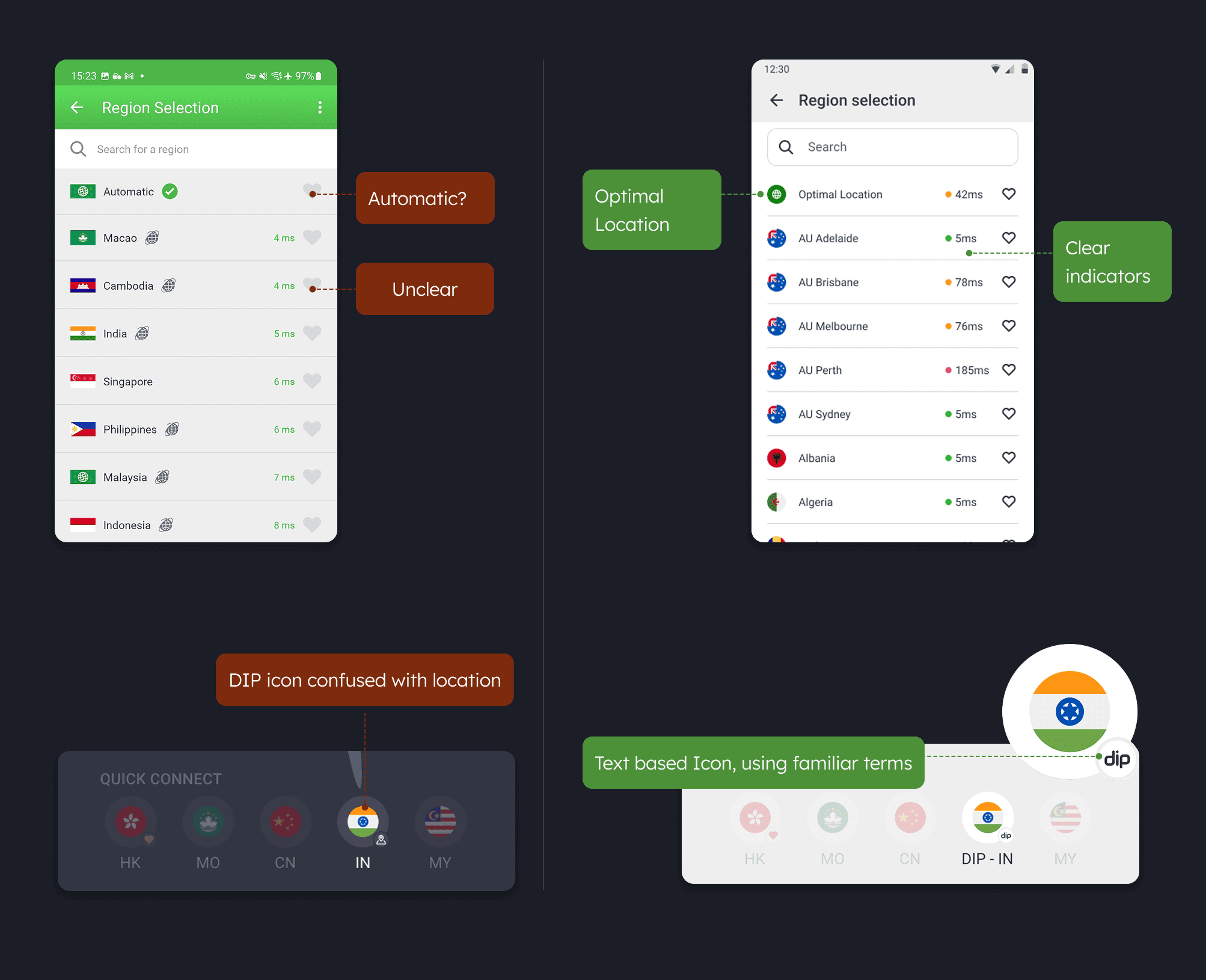
"Automatic" didn't communicate its purpose.
Latency was shown as plain text (4ms) with no indicator of whether that was good or bad. The Dedicated IP icon (map pin) was confused with location.
Solution:
Renamed "Automatic" to "Optimal Location"
Added color-coded latency indicators (green/yellow/red dots) paired with readable ms values so users immediately understand connection quality
Replaced the Dedicated IP map pin with a text-based "dip" icon and clear "DIP - IN" label in Quick Connect
Server selection clarity
Problem:
"Automatic" didn't communicate its purpose.
Latency was shown as plain text (4ms) with no indicator of whether that was good or bad. The Dedicated IP icon (map pin) was confused with location.
Solution:
Renamed "Automatic" to "Optimal Location"
Added color-coded latency indicators (green/yellow/red dots) paired with readable ms values so users immediately understand connection quality
Replaced the Dedicated IP map pin with a text-based "dip" icon and clear "DIP - IN" label in Quick Connect
Accessibility improvements
Problem
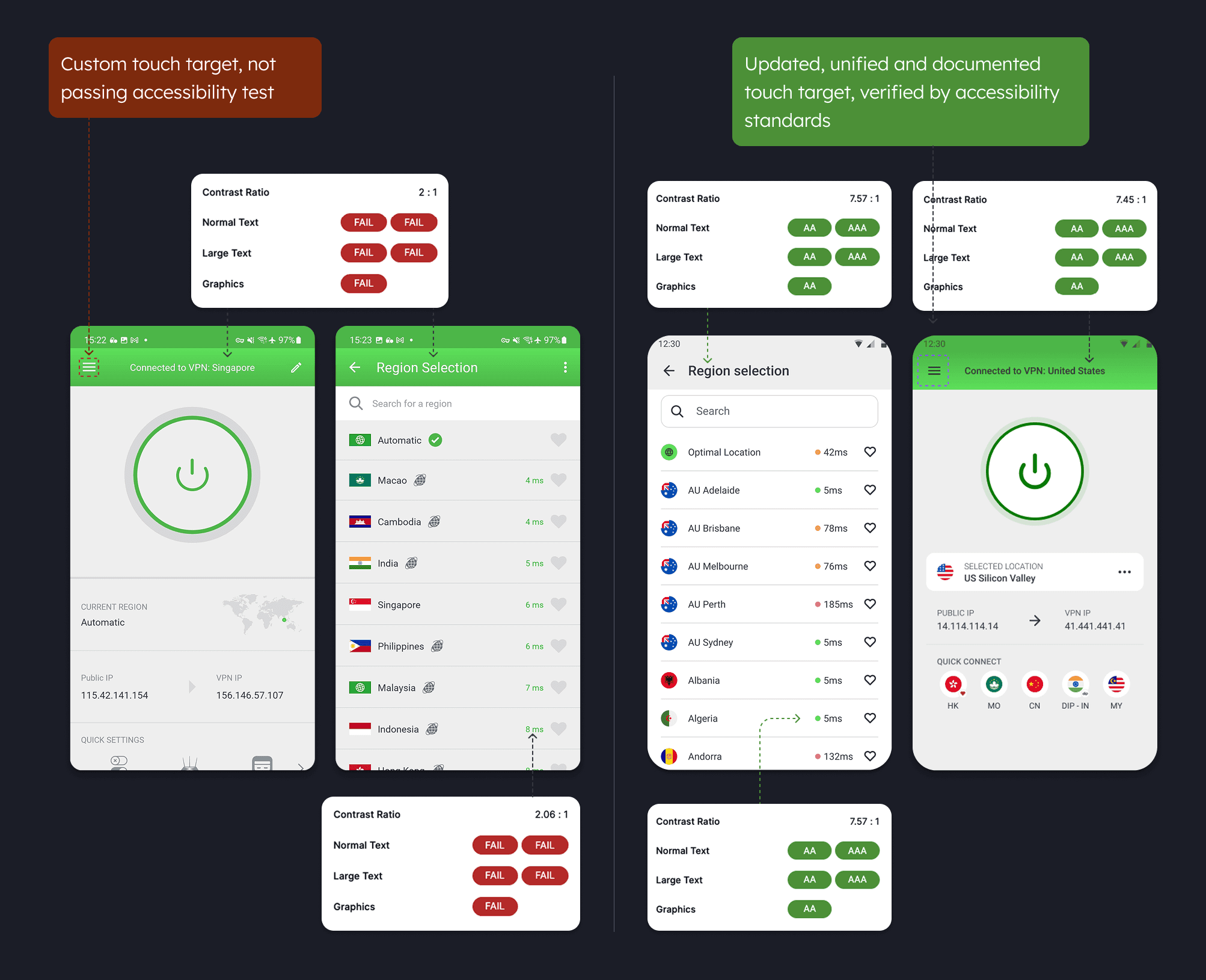
Contrast ratio was 2:1, failing all WCAG checks for normal text, large text, and graphics. Touch targets were undersized.
Solution:
Improved contrast ratio from 2:1 to 7.57:1, achieving AA and AAA compliance across all text and graphics
Updated, unified, and documented touch targets verified against accessibility standards
Added light theme option with improved contrast
Larger, clearer touch targets throughout the region list and Quick Connect bar
Accessibility improvements
Problem
Contrast ratio was 2:1, failing all WCAG checks for normal text, large text, and graphics. Touch targets were undersized.
Solution:
Improved contrast ratio from 2:1 to 7.57:1, achieving AA and AAA compliance across all text and graphics
Updated, unified, and documented touch targets verified against accessibility standards
Added light theme option with improved contrast
Larger, clearer touch targets throughout the region list and Quick Connect bar
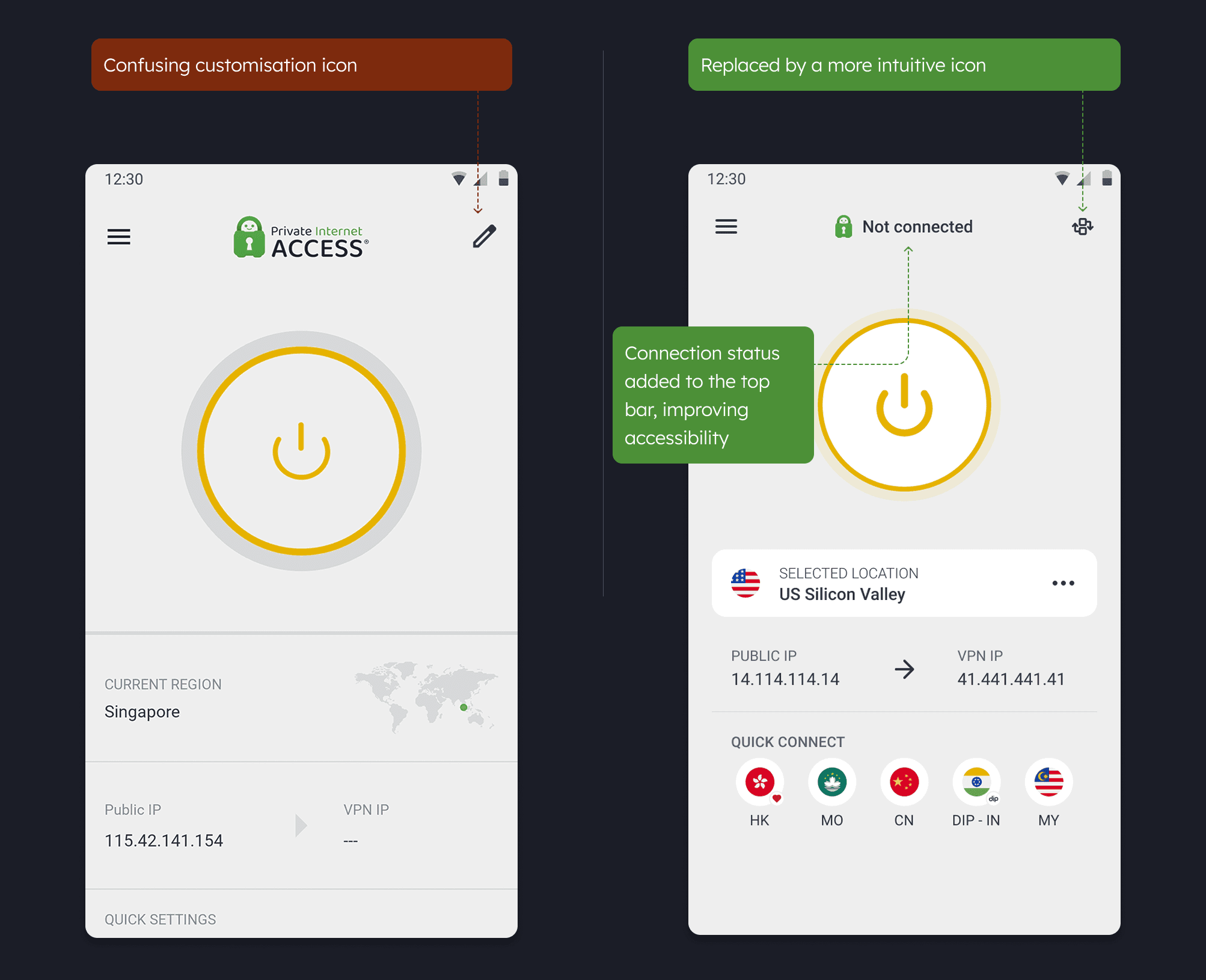
Customization control and layout
Problem:
The pencil icon was mistaken for connection editing. The large logo and "CURRENT REGION" label wasted header space. Less information was visible without scrolling.
Solution:
Replaced pencil with a sections change icon that clearly indicates customization
Added connection status text ("Not connected") to the top bar, improving accessibility
Better space utilization with smaller elements that don't compromise accessibility
More useful information visible on one screen: "SELECTED LOCATION" card with flag, PUBLIC IP and VPN IP displayed clearly
Added Quick Connect bar with country shortcuts for faster access
Customization control and layout
Problem:
The pencil icon was mistaken for connection editing. The large logo and "CURRENT REGION" label wasted header space. Less information was visible without scrolling.
Solution:
Replaced pencil with a sections change icon that clearly indicates customization
Added connection status text ("Not connected") to the top bar, improving accessibility
Better space utilization with smaller elements that don't compromise accessibility
More useful information visible on one screen: "SELECTED LOCATION" card with flag, PUBLIC IP and VPN IP displayed clearly
Added Quick Connect bar with country shortcuts for faster access
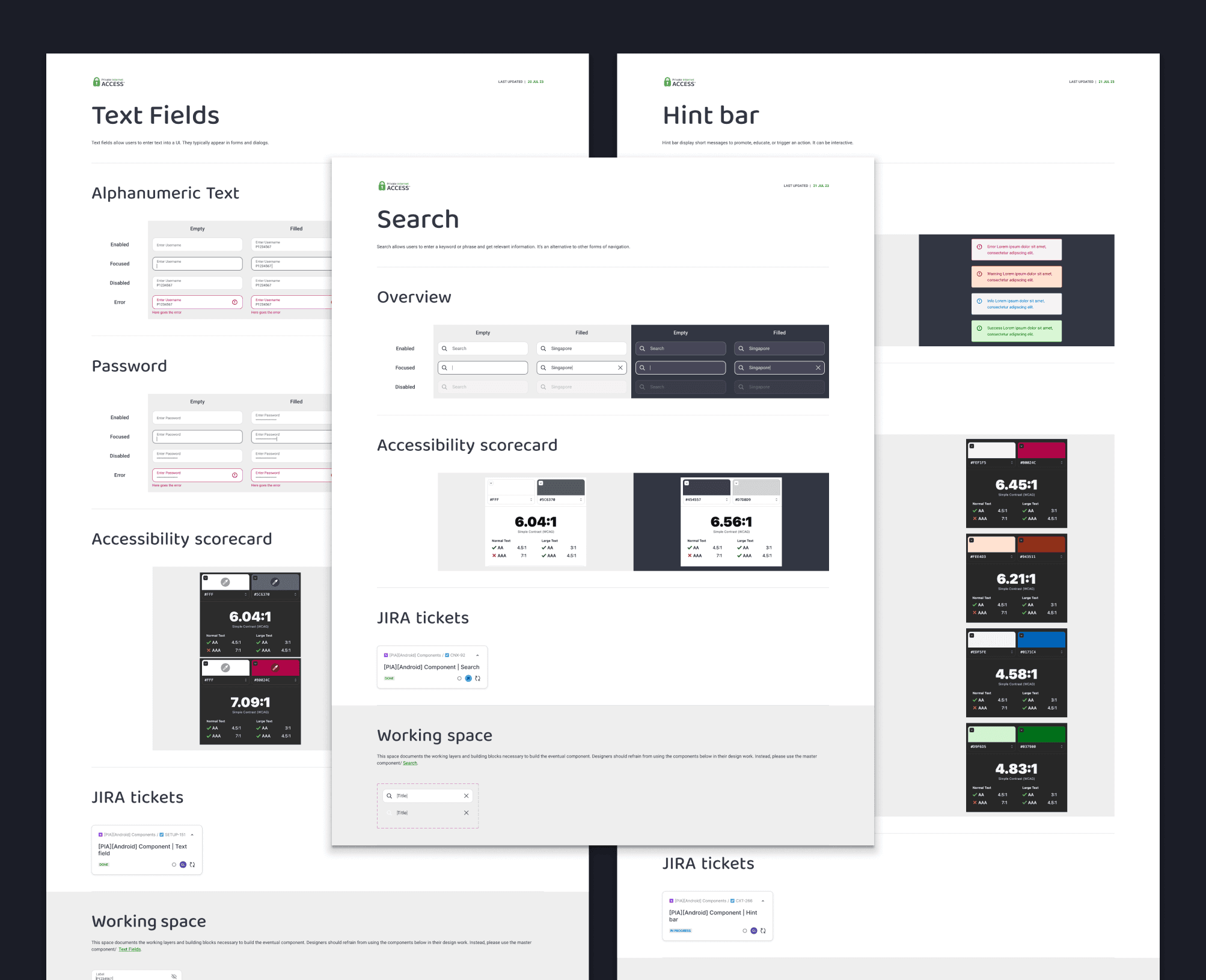
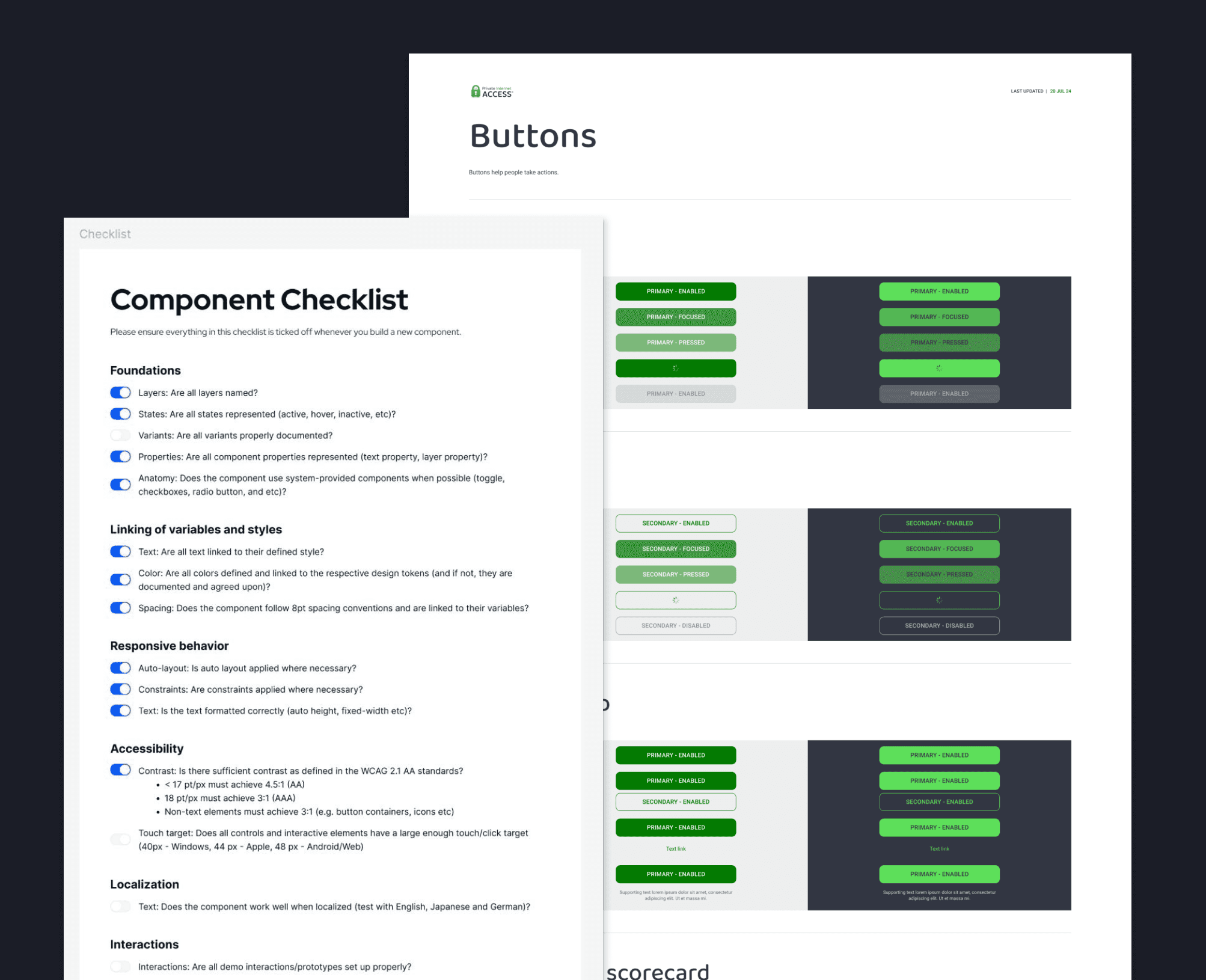
Documentation and component system
Problem:
Components had been designed in isolation with no documentation. This created duplicated patterns, inconsistent states, and made QA difficult.
Solution:
Redesigned components documented in Figma with states, variants, and accessibility notes
Created a centralized component library guide as a single source of truth
Established a component QA checklist covering states, constraints, localization, and accessibility
Streamlined QA and developer handoff
Documentation and component system
Problem:
Components had been designed in isolation with no documentation. This created duplicated patterns, inconsistent states, and made QA difficult.
Solution:
Redesigned components documented in Figma with states, variants, and accessibility notes
Created a centralized component library guide as a single source of truth
Established a component QA checklist covering states, constraints, localization, and accessibility
Streamlined QA and developer handoff
Documentation and component system
Problem:
Components had been designed in isolation with no documentation. This created duplicated patterns, inconsistent states, and made QA difficult.
Solution:
Redesigned components documented in Figma with states, variants, and accessibility notes
Created a centralized component library guide as a single source of truth
Established a component QA checklist covering states, constraints, localization, and accessibility
Streamlined QA and developer handoff
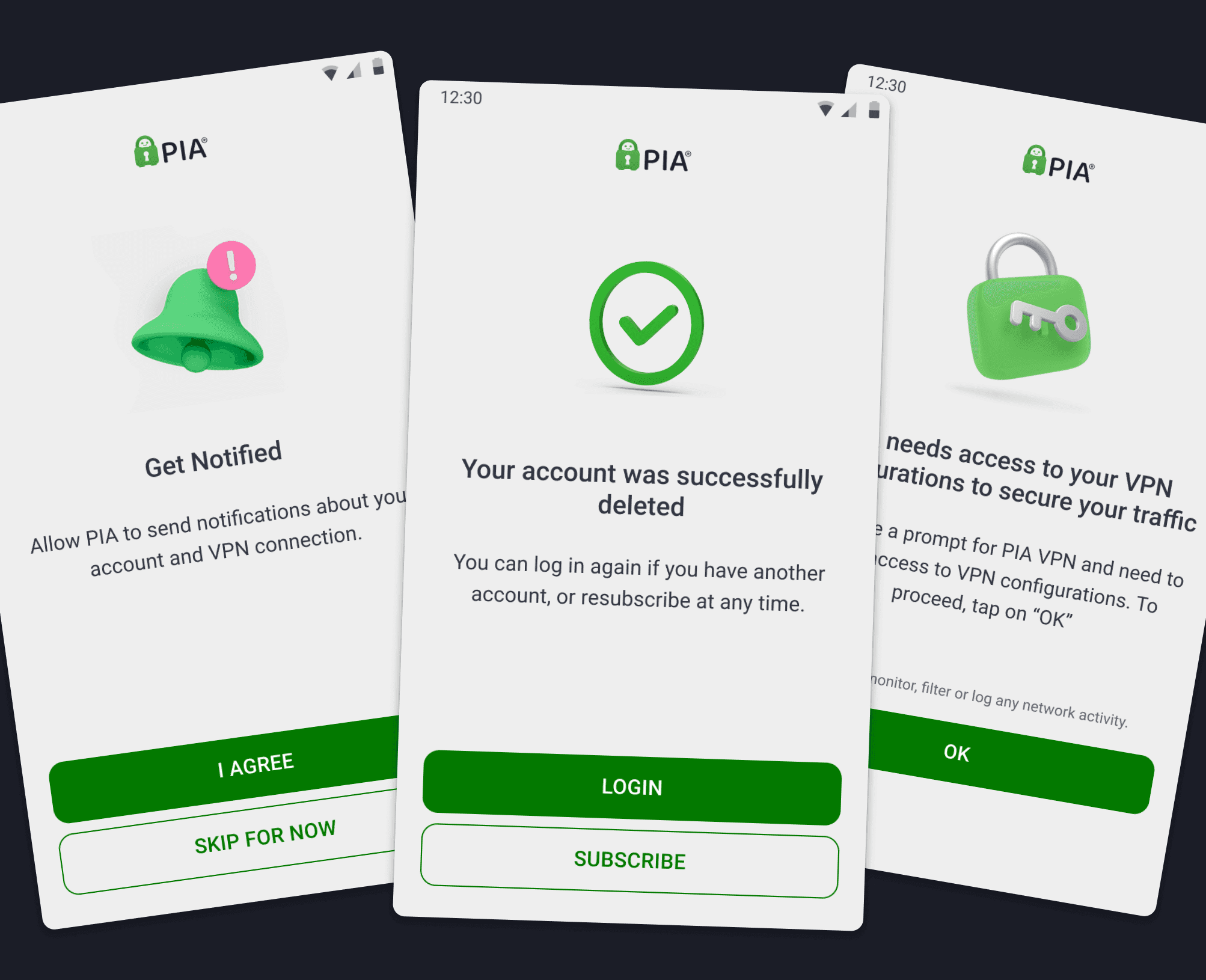
Visual consistency
Problem:
The app reflected pre-2021 brand elements with 2D illustrations and a mascot. This visual disconnect from the refreshed marketing identity looked dated and weakened trust.
Solution:
Updated typography, color palette, and iconography to align with PIA's 2021 brand
Unified the look and feel across screens, eliminating inconsistencies between flows
Ensured cohesion with marketing and web experiences
Introduced subtle motion in key transitions to modernize the interface
Visual consistency
Problem:
The app reflected pre-2021 brand elements with 2D illustrations and a mascot. This visual disconnect from the refreshed marketing identity looked dated and weakened trust.
Solution:
Updated typography, color palette, and iconography to align with PIA's 2021 brand
Unified the look and feel across screens, eliminating inconsistencies between flows
Ensured cohesion with marketing and web experiences
Introduced subtle motion in key transitions to modernize the interface
Visual consistency
Problem:
The app reflected pre-2021 brand elements with 2D illustrations and a mascot. This visual disconnect from the refreshed marketing identity looked dated and weakened trust.
Solution:
Updated typography, color palette, and iconography to align with PIA's 2021 brand
Unified the look and feel across screens, eliminating inconsistencies between flows
Ensured cohesion with marketing and web experiences
Introduced subtle motion in key transitions to modernize the interface
Results
User Outcomes:
Optimal Location adoption +32%
Dedicated IP usage +27%
Server selection time -19%
User satisfaction 62% to 84%
System outcomes:
Accessibility compliance increased to 95% of WCAG 2.1 AA
QA time -40% through documented components and checklists
Visual consistency issues -60% across platforms
User Outcomes:
Optimal Location adoption +32%
Dedicated IP usage +27%
Server selection time -19%
User satisfaction 62% to 84%
System outcomes:
Accessibility compliance increased to 95% of WCAG 2.1 AA
QA time -40% through documented components and checklists
Visual consistency issues -60% across platforms
Conclusion
The redesign transformed the PIA app into a modern, accessible, and scalable product. By addressing usability gaps in core flows, fixing accessibility failures, and building a documented component library, we improved daily interactions and reduced design debt.
The new design system ensured brand consistency across platforms and created a foundation for faster iteration. It also established a repeatable framework for future audits and redesigns across the product suite.
The redesign transformed the PIA app into a modern, accessible, and scalable product. By addressing usability gaps in core flows, fixing accessibility failures, and building a documented component library, we improved daily interactions and reduced design debt.
The new design system ensured brand consistency across platforms and created a foundation for faster iteration. It also established a repeatable framework for future audits and redesigns across the product suite.
Alex Dihel | Product & Marketing Design Leader | Design Operations www.alexdihel.com © | Privacy
Alex Dihel | Product & Marketing Design Leader | Design Operations www.alexdihel.com © | Privacy
Alex Dihel | Product & Marketing Design Leader | Design Operations www.alexdihel.com © | Privacy